Auxoliev Knee Massager with Heat and Vibration
Auxoliev's knee massager line delivers heat therapy and vibration massage in a cordless, wearable unit you strap directly to the knee — no clinic appointment, no power cord tethering you to a wall. Both models are FSA and HSA eligible, built for adults managing knee stiffness, joint discomfort, or the kind of dull ache that sets in after a long day on your feet or too many hours at a desk.

Both Models, Side by Side
Cordless Knee Massager with Heat (Cyan)
See on Amazon
FSA Knee Massager with Heat Black
See on AmazonSee more products
Discover the full product lineup with current selection on Amazon.
All products on AmazonKnee Massager Specs Compared
Both models share the same dimensions and core features. The table below lays out the confirmed specs side by side so you can make a direct comparison without scrolling between listings.
| Model | Color | Weight | Dimensions | FSA/HSA Eligible | Display | Best For |
|---|---|---|---|---|---|---|
| Knee Massager with Heat, LED Screen and Vibration (B0DSFJTTRW) | Cyan | 1.58 lbs | 5 × 3 × 3 in | Yes | LED Screen | Users where weight isn't a primary concern; more reviewed unit with higher average rating |
| FSA Eligible Knee Massager with Heat and Vibration (B0DSFDCDD5) | Black | 1.25 lbs | 5 × 3 × 3 in | Yes | LED Screen | Users prioritizing the lightest possible unit; those with joint sensitivity to added weight |
If weight is a non-issue for your use case, the Cyan model's larger review base gives you more buyer Q&A data to draw from before purchase — if you want the lightest unit on your knee, the Black model's 1.25 lbs is the practical choice.
How to Choose Between the Two Knee Massagers
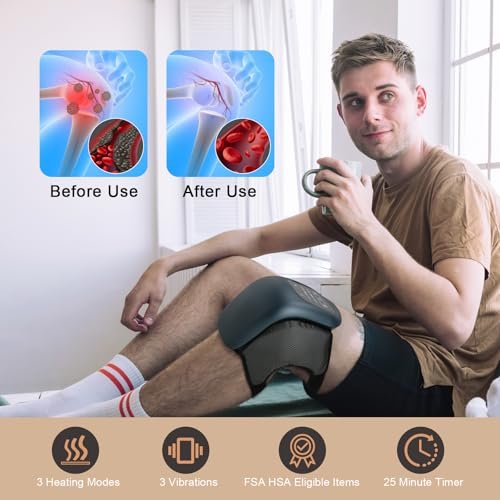
Both units share the same 5×3×3 inch footprint and the same core feature set — heat, vibration, an LED screen, adjustable straps, and a built-in timer. The practical difference comes down to weight and color. The Cyan model weighs 1.58 pounds; the Black model comes in at 1.25 pounds. That 0.33-pound gap is real when the device is strapped to your knee during a session, especially if you tend to use it while seated at a desk or reclined on a couch with your leg elevated.
If you're managing significant knee discomfort and plan to use the massager daily, the lighter Black unit reduces fatigue on the joint itself — particularly relevant if your knee is already sensitive to added weight or pressure. The Cyan model's slightly heavier build doesn't indicate more power or more features; both units are spec-equivalent in every listed category. Color preference and weight tolerance are genuinely the deciding factors here.
- Choose the Black model if you want the lightest possible unit on your knee, or if you're buying this for someone with significant joint sensitivity.
- Choose the Cyan model if weight isn't a concern and you prefer the color — the extra 0.33 pounds is negligible for most users during a seated session.
- Both qualify for FSA and HSA purchases — if you're allocating pre-tax healthcare dollars, either unit applies.
One thing worth flagging: the Cyan model carries a higher review count (89 reviews vs. 35) and a slightly higher average rating (3.9 vs. 3.7). That's not a dramatic gap, but the Cyan unit has more user data behind it, which is useful context if you're the type to weight sample size in purchasing decisions.
Real-World Use and Who Each Model Suits
These are wearable, strap-on devices — they're designed to be used hands-free once secured. The adjustable straps accommodate a range of knee sizes, but fit matters more than most product pages acknowledge. If your knees are on the narrower or wider end of the range, check the Amazon Q&A section for sizing notes from buyers with similar builds before purchasing. A massager that doesn't cup the knee properly won't deliver consistent heat or vibration contact, which is the most common complaint in the lower ratings for this category.
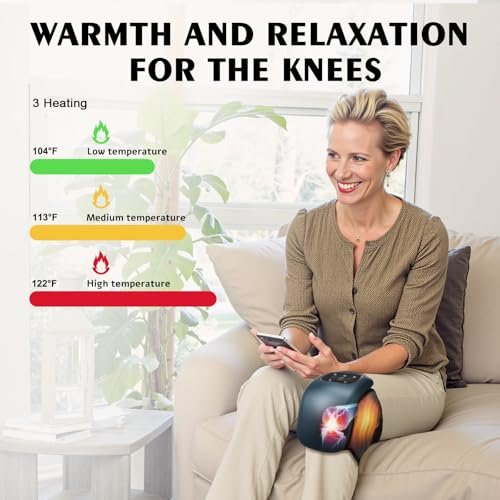
The LED screen on both units is a practical feature, not a marketing add-on. It lets you monitor heat level, vibration mode, and remaining session time without removing the device or guessing at which setting you've activated. The built-in timer — which automatically shuts the unit off — means you can set it and genuinely forget it, which matters if you're using this during a work break, while watching TV, or while doing light reading. You don't have to actively monitor the session.
- Desk workers and remote sitters who experience knee stiffness from prolonged sitting can use either unit during a seated break — the cordless design means no cable to route and no wall outlet required nearby.
- Post-workout recovery users who want to combine heat and vibration after lower-body training sessions will find the strap system holds during light movement, though these units aren't designed for use during exercise itself.
- Older adults managing arthritis-related knee stiffness may prefer the Black model's lighter weight to minimize any added burden on a sensitive joint.
- Users with post-surgical knees should consult their physician before use — heat and vibration therapy near a surgical site requires medical clearance, and neither unit replaces that conversation.
The heat function is typically where new users feel results first — it activates quickly and the warmth around the joint is noticeable within the first few minutes of a session. The vibration works as a complement to the heat rather than a standalone benefit; most reviewers who adapt positively to the device report using the heat consistently and experimenting with vibration mode as a secondary layer.
Safe Operation and Common Mistakes to Avoid
The auto-shutoff timer is both a safety mechanism and a session guide. Don't override or ignore it — the timer exists to prevent extended heat exposure on a joint that's already inflamed or sensitive. Run your session within the timer's range and let the device power down naturally rather than restarting it immediately for a second consecutive session on the same knee.
Start the vibration intensity low if you're new to this type of therapy. Jumping to the highest vibration mode on a stiff or painful joint isn't more effective — it's more likely to cause discomfort and lead you to abandon the device before you've given the heat and vibration combination time to work together. The graduated approach (heat on, low vibration first, increase if comfortable) produces better results and a more accurate sense of what the device can actually do for your specific pain pattern.
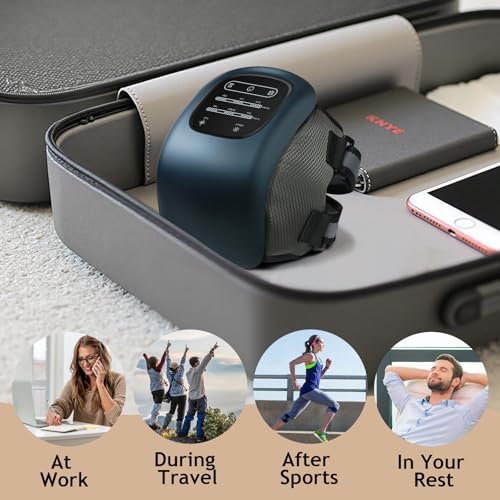
- Do not use on broken skin, open wounds, or directly over an active inflammation site without medical guidance — heat therapy on acutely inflamed tissue is different from heat therapy on chronic stiffness.
- Secure the straps snugly but not tight — the unit needs stable contact with the knee to deliver consistent heat and vibration, but cutting off circulation defeats the purpose of improved blood flow.
- Keep the unit dry — these are not waterproof devices. Store them away from moisture and don't use them immediately after hot/cold water therapy when skin is still wet.
- Charge fully before first use and don't store the unit long-term at zero battery — both units are cordless and battery-powered, so battery maintenance matters for longevity.
- If you have a pacemaker, implanted medical device, or significant circulatory condition, consult your doctor before using any vibration or heat therapy device on your lower body.
Cleaning is straightforward: wipe the outer shell with a dry or slightly damp cloth. Don't submerge either unit or use cleaning sprays directly on the fabric strap sections — fabric straps can typically be spot-cleaned but should air-dry completely before the next session.
Frequently Asked Questions
Can I use the knee massager while walking or moving around?
These units are designed for stationary use — seated, reclined, or standing in place. The adjustable straps secure the device during light position shifts, but the massager isn't built for use during walking, exercise, or any activity where the knee is under dynamic load. Use it during a rest break, not as an active-use wearable.
Are both models genuinely FSA and HSA eligible, or is that just listed on one of them?
Both models carry FSA and HSA eligibility. The Black model (B0DSFDCDD5) includes "FSA Eligible" directly in its product title, and the Cyan model (B0DSFJTTRW) is also listed as eligible. If you're purchasing through Amazon with an FSA/HSA card or account, both units should process as qualifying health devices — but confirm the eligibility filter is active on your Amazon account at checkout to ensure the transaction routes correctly.
How long does a typical session last before the auto-shutoff activates?
Both units include a built-in timer with auto-shutoff. The LED screen lets you monitor remaining session time during use. The timer is there to prevent prolonged heat exposure on a single joint — treat the auto-shutoff as your session endpoint rather than a prompt to restart immediately. If you want a second session, give the knee a brief rest interval first.
Will the straps fit my knee if I have a larger or narrower build than average?
The adjustable strap system is designed to cover a range of knee sizes, but fit is the most common variable in user experience with this type of wearable massager. If you have a particularly narrow or wide knee circumference, check the Amazon listing's customer Q&A section — buyers with specific sizing concerns often post their measurements and results there, which gives you more accurate sizing data than the product description alone.
Is this safe to use on a knee that has had surgery?
No — not without physician clearance first. Heat and vibration therapy near a surgical site carries risks that depend entirely on the type of surgery, how recently it occurred, and the current state of the tissue. Neither unit is a post-surgical rehabilitation device. If your knee pain is post-surgical in origin, talk to your orthopedic surgeon or physical therapist before using any at-home heat or vibration therapy on that joint.
Why does the Cyan model weigh more than the Black model if the dimensions are the same?
Both units measure 5×3×3 inches, but the Cyan model weighs 1.58 pounds versus 1.25 pounds for the Black model. The 0.33-pound difference likely reflects minor variations in internal component configuration or casing materials between the two versions — both are listed separately with distinct ASINs, suggesting they're not identical units despite the same external dimensions. The functional feature set (heat, vibration, LED screen, adjustable straps, timer) is the same across both.